Open ‘AI Skill Package’ Specification
A .aiskill file is a ZIP archive — a versioned, unit-tested package that delivers an AI agent skill as a structured artifact. Where an AI Skill is an ephemeral text prompt, an AI Skill Package is a deployable, reproducible, integrity-verified unit of capability.
This specification defines the .aiskill open standard: the file format, manifest schema, directory layout, checksum protocol, and capability token registry. The standard is technology-agnostic — any AI runtime that can read a ZIP archive and execute assets can implement it.
.aiskill format's specific combination of mandatory integrity checksums, unit testing, and manifest-based versioning (see No prior art for the full scope of this claim). This document is the normative specification for v2.4.0.
SYSTEM.md, an invariant protocol bundled inside every package, requires the agent to verify the package against an independent registry before it may proceed at all, and to stop — unconditionally — if that check fails or can't be completed. The agent stops governing itself and starts being governed by a process it did not write and cannot skip. That's the independence the date marks.
What this spec covers
- The distinction between ephemeral AI Skills and versioned AI Skill Packages
- The complete
.aiskillZIP layout and all required/optional files - The normative
manifest.yamlfield reference - The determinism principle and why it matters for AI-executed computation
- Step-by-step tutorial for creating your first
.aiskillpackage - Real-world examples from the WCP ecosystem
- The full capability token registry and MIME type association
Showcase — Skills in Action
The page you are reading was built by running the three AI Skill Packages below against it. Download any package and give your AI agent the prompt shown — it will apply the skill to your own SPA in the same way.
If applying the WCP packages, order matters: run WCP SPA WCP Compliance first — WCP SPA Theme Settings depends on the 81-token design system it installs. The WCAG Contrast Audit is independent and can be applied at any stage, including against your own existing site before running anything else. Try it: running the audit against an HTML project you already own will surface the contrast gaps already present in your pages — a result that is immediately actionable for every developer who ships HTML, with or without WCP.
WCP SPA WCP Compliance
v2.0.0Upgrades a bespoke-CSS SPA to the full WCP 81-token --wcp-* design token system and installs the WCP theme runtime script — making every page theme-swap capable.
<style> block opens with 81 --wcp-* CSS custom properties. The runtime script appears inline before </head>.
WCP SPA Theme Settings
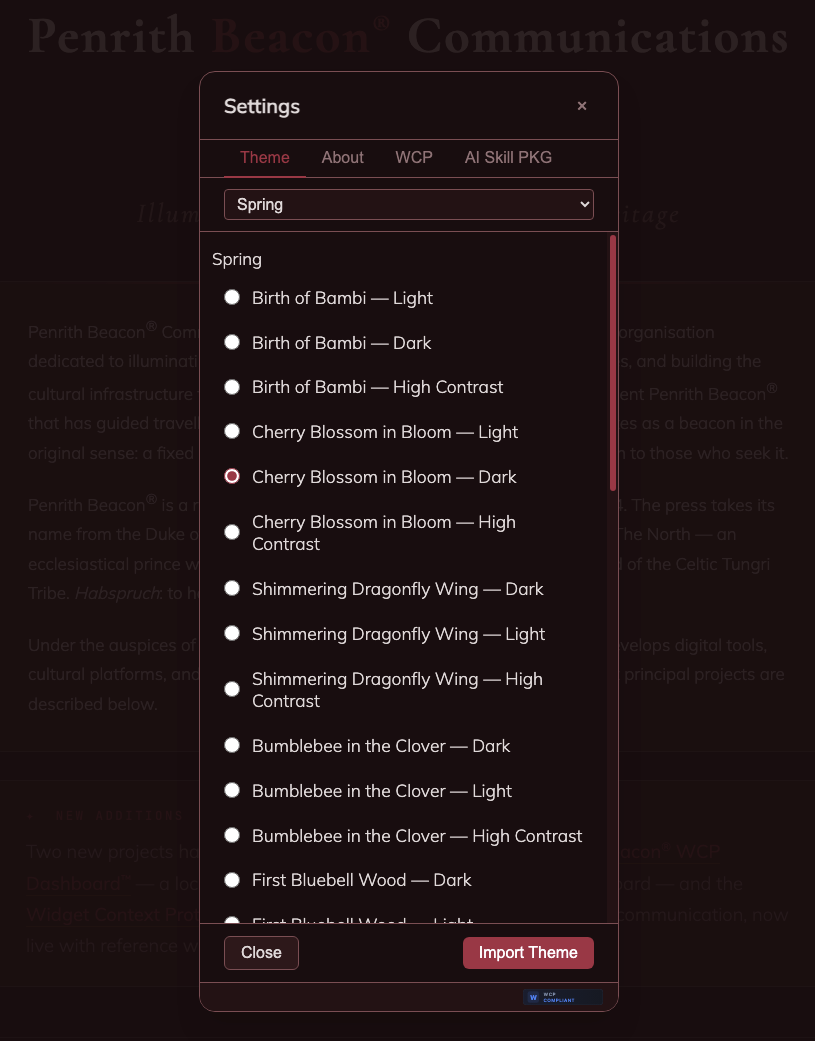
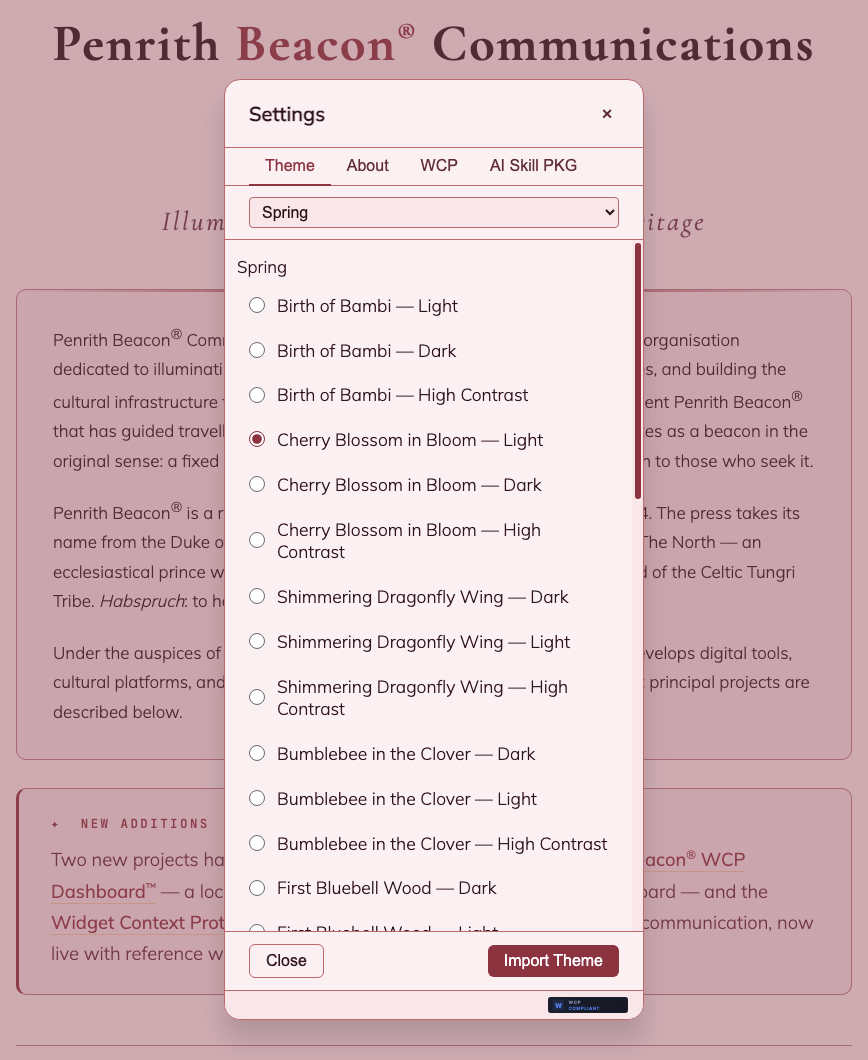
v2.0.0Embeds the WCP Settings modal — gear button, three-tab panel, built-in themes, seasonal .wcpt collections, URL export, and .wcpt import wizard — into any WCP-compliant SPA.
WCAG Contrast Audit
v2.0.0Audits foreground/background colour pairs extracted from a target SPA against WCAG 2.1/2.2 AA and AAA contrast ratios. Produces a pass/fail table with ratio values and EAA compliance status.
index.html. The European Accessibility Act mandates this standard from 28 June 2025.
Build Your Own AI Skill Packages
Every AI Skill Package begins here. CREATE-AISKILL is the origin skill — the one package that was not itself created by a skill, and from which every skill that follows can be made.
If you can describe what you want an AI agent to do, you can create an AI Skill Package. You don't need prior experience with packaging, version control, or software structure — just tell the agent your idea in plain language and it will ask you the questions it needs to build everything around your answer. The result is a skill you can load into any AI agent runtime, keep for personal use, or share with others.
For developers: CREATE-AISKILL produces a fully spec-compliant repository from the first commit, with an optional GitHub remote. If you plan to distribute your skill publicly, a public repository lets users inspect the source and verify it is safe — but for personal use, a local-only skill works just as well.
Create AI Skill Package
v2.5.0The skill that creates skills. Describe your idea in plain language and the agent builds the complete package structure around it — all required files, version control, and an optional public repository so others can trust and use what you've made.
AI Skills
An AI Skill is a plain UTF-8 Markdown file that instructs an AI agent how to perform a task. It is the simplest unit of AI capability distribution: write a prompt, save it as a .md file, give the AI a URL or paste the content — the skill is loaded.
Characteristics
- Ephemeral — the skill fires, the AI generates output, the session ends. Nothing persists between sessions.
- Text-only — instructions, no versioned assets, no tests, no integrity guarantees.
- Runtime-generated output — the AI interprets the skill and writes code, prose, or instructions fresh each time. Output varies by model, session, and context.
- Zero infrastructure — a Markdown file in a GitHub repository is sufficient. No build step, no packaging.
AI Skills are excellent for conversational guidance, creative workflows, general-purpose reasoning tasks, and routing logic. They are the right tool when the output is meant to be read, not executed.
AI-SKILL.md files in GitHub repositories form a skill chain for building and releasing WCP widgets and agents. These are classic AI Skills — loaded by URL, consumed by any AI, no packaging required.
AI Skill Packages
An AI Skill Package is a .aiskill file — a ZIP archive that bundles a skill's instructions alongside versioned, unit-tested assets that the AI executes rather than generates.
What a package contains
- SKILL.md — the entry point: tells the AI what the skill does and how to execute the assets
- manifest.yaml — machine-readable metadata: identity, version, author, capabilities, permissions
- assets/ — versioned scripts, templates, data files — anything the skill needs at runtime
- inputs/ — JSON Schema describing the inputs the skill accepts from the runtime
- checksums.yaml — SHA-256 integrity hashes for every file in the archive
What makes a package different from a skill
The AI does not write the assets — it executes them. A packaged Python script produces the same output every run, regardless of which AI session is running it or what model version is in use. The unit tests in the package prove this at packaging time.
Why Packages Matter
Consider asking an AI to write a WCAG contrast-ratio checker. In an ephemeral session, the AI generates a Python snippet on the fly. The snippet may be correct — or it may silently mishandle the gamma-correction step. In a different session, a different version of the model may generate slightly different code. There is no way to know which version was used, no test suite to verify it, and no checksum to confirm the script hasn't changed.
An AI Skill Package solves each of these problems:
| Problem | Ephemeral AI Skill | AI Skill Package |
|---|---|---|
| Reproducibility | Re-generated each session — output may vary | Fixed asset in the archive — identical every run |
| Correctness | Validated by human review only | Unit tests in assets/tests/ — proven at packaging time |
| Integrity | Prompt can be modified without detection | SHA-256 checksums — any change is detectable |
| Versioning | No version — the prompt is the prompt | Semantic version in manifest.yaml, git-tagged |
| Auditability | Session log only | Package ID + version + checksum = full audit trail |
Packages are not a replacement for AI Skills. They are the right tool when the skill's output is executed as code — when correctness, reproducibility, and auditability matter.
Open Standard, Technology-Agnostic
The .aiskill format is an open standard. It makes no assumptions about:
- AI runtime — Claude, GPT-4, Gemini, local models, or any future agent that can read a ZIP
- Host platform — macOS, Linux, Windows, container, CI runner
- Asset language — Python, shell, Node.js, Go, or any language the runtime can execute
- Distribution channel — local filesystem, GitHub Release, private registry, email attachment
The standard was born in the Widget Context Protocol ecosystem, where the first two production AI Skill Packages — WCP SPA WCP Compliance and WCP SPA Theme Settings — were developed and deployed. However, the format is not WCP-specific. It is applicable to any domain where AI agents execute structured tasks.
.aiskill extension and format are pioneering.
File Structure
A .aiskill file is a standard ZIP archive with a mandatory directory layout. The archive is renamed from .zip to .aiskill after packaging.
Required files
manifest.yaml— machine-readable package metadata (see manifest.yaml)SYSTEM.md— invariant verification protocol, read first, before anything else (see SYSTEM.md)SKILL.md— the AI's entry point; instructions for executing the package, read only afterSYSTEM.md's protocol completes (see SKILL.md)CARD.md— human-facing summary shown when a runtime presents the package for selection, before it's used (see CARD.md)README.md— human-readable documentation, opening with three standardized headings (## Synopsis,## How It Works (Behavior),## What's in this .aiskill package?) before any prerequisites/quick-start/development-workflow content — see the callout below on required structure. This is the only copy a recipient of the distributed.aiskillfile ever sees, since packaging only ever zips the archive's own contents — see the second callout below on its required relationship to the repository-root copyCHANGELOG.md— version history following the Keep a Changelog conventionassets/— at least one asset file; the execution artifacts of the skillchecksums.yaml— SHA-256 hashes of every file in the archive (see checksums.yaml)
Optional directories and files
inputs/— JSON Schema for runtime-provided inputs (see inputs/ & schema.json)images/— screenshots or diagrams referenced bySKILL.mddocs/— supplementary documentation for human readersLICENSE.txt— full license text, for cases the one-linelicensemanifest field can't carry on its own (e.g.license: "Proprietary. LICENSE.txt has complete terms")
{SLUG}-{VERSION}.aiskill. The slug is the last segment of the reverse-domain id, rendered in UPPER-KEBAB-CASE. The file extension is always lowercase. Example: WCAG-CONTRAST-AUDIT-1.0.0.aiskill. Repository names on GitHub are prefixed AISKILL-, e.g. AISKILL-WCAG-CONTRAST-AUDIT. Converted packages (see Provenance & Converted Packages) use an extended pattern with a lowercase origin segment, e.g. AISKILL-anthropics_skills-WEBAPP-TESTING.
.aiskill package's repository has README.md in two places: at the repository root (what a visitor sees first on GitHub) and at README.md inside the packaged archive shown above (the only copy anyone receiving the distributed .aiskill file directly ever sees, since packaging tools only ever zip the archive's own contents, never the repository root). These two files must be byte-identical — not merely similar, not "the same content reformatted." A registry accepting a package registration or a version sync must independently fetch both copies and compare their hashes; a mismatch, however small — even a single corrected typo made in one copy and not the other — is a registration failure, not a style warning. This mirrors the existing external-verification principle for SYSTEM.md (see SYSTEM.md): a package's own bundled claim that its files are consistent is never sufficient on its own.
README.md to a person (a skill library, a package browser) is showing it out of context — the reader isn't browsing a GitHub repository, they're looking at one entry in a list of skills. The first three ## headings must always be, in this exact order:
## Synopsis— the manifest's ownsynopsisfield, verbatim, not paraphrased or trimmed## How It Works (Behavior)— a reader-facing account of what actually happens when the skill runs, written for someone reading this from inside a skill library, not for someone browsing a repository## What's in this .aiskill package?(or.mdskill package?for that sibling format) — the archive's file listing, reworded to describe a package the reader is holding, not a repository they're browsing. For an.mdskillpackage specifically, this section must also note that a package needingassets//inputs/is instead built as.aiskill
manifest.yaml
The manifest.yaml file is the machine-readable identity record for the package. It must be a valid YAML file located at the root of the archive.
Example
name: WCAG Contrast Audit
id: com.widgetcontextprotocol.wcag-contrast-audit
uuid: d5e9f012-3a4b-4c8d-9e0f-1a2b3c4d5e6f
version: 1.0.0
description: Audits colour pairs against WCAG 2.1/2.2 contrast ratios
synopsis: |
  Checks every foreground/background colour pair in a design system against
  the WCAG 2.1/2.2 contrast ratio thresholds, flagging any pair that fails
  AA or AAA for normal and large text.

  Reach for this before shipping a new theme or palette, or when auditing an
  existing site for accessibility compliance — it catches contrast failures
  a human eye can miss, especially on saturated or low-luminance colours.

  Ships with unit tests covering the WCAG ratio formula itself, so the
  numbers it reports are the same numbers a manual calculation would give.
author: Penrith Beacon
entry: SKILL.md
license: MIT
minimum_runtime: 1.0.0
capabilities:
  - filesystem.read
permissions:
  filesystem.read:
    paths: ["./inputs/", "./assets/"]
homepage: https://openaiskillpackage.com
repository: https://github.com/penrithbeacon/aiskill-wcag-contrast
authorEmail: hello@penrithbeacon.com
tags: [accessibility, wcag, contrast, audit]
type: analytical
Field summary
| Field | Type | Description | |
|---|---|---|---|
| name | required | string | Human-readable skill name |
| id | required | string | Reverse-domain ownership identifier, e.g. com.example.skill-name. Encodes authorship; verifiable via DNS TXT record for registry submission. |
| uuid | required | string | UUID4 globally-unique identifier, generated once at package creation. Collision-safe across registries and shared file systems regardless of domain ownership changes. |
| version | required | semver | Package version following Semantic Versioning 2.0 |
| description | required | string | One-line statement of the skill's purpose |
| synopsis | required | string (multi-paragraph) | Expanded, human-facing account of the skill — what it does, when to reach for it, and why to trust this package. Authored directly, never derived by parsing README.md (see manifest.yaml fields) |
| author | required | string | Author name or organisation |
| entry | required | string | Relative path to the AI entry point, e.g. SKILL.md |
| system_protocol_version | required | semver | Which SYSTEM.md protocol version this package ships — must match SYSTEM.md's own Protocol Version header exactly (see SYSTEM.md) |
| license | required | string | SPDX identifier (MIT, Apache-2.0), Proprietary, or UNLICENSED (no license selected by the author — falls back to default copyright protection, all rights reserved) |
| minimum_runtime | required | semver | Minimum AI Skill runtime version required to execute this package |
| capabilities | required | list | Capability tokens the skill requires (see Capability token registry) |
| permissions | optional | object | Capability-specific permission constraints |
| homepage | optional | string | Canonical URL for the skill or its documentation |
| repository | optional | string | Source repository URL |
| authorEmail | optional | string | Contact email address |
| wcpVersion | optional | string | WCP spec version targeted (WCP-specific skills only) |
| tags | optional | list | Discovery tags for registries and search |
| type | optional | string | procedural | analytical | generative | instructional |
| origin | optional | string | Set to converted if this package was derived from a skill in another format — see Provenance & converted packages |
See the normative reference table for full field constraints, allowed values, and validation rules.
SKILL.md — The Entry Point
SKILL.md is the task-specific entry point the AI runtime reads once SYSTEM.md's verification protocol has passed — not the first file read overall as of v2.2.0. It is a plain Markdown document that tells the AI what the skill does, what assets to execute, and what arguments or inputs to pass.
What SKILL.md must contain
- A brief description of the skill's purpose
- Clear instructions for executing each asset (script name, arguments, expected output)
- Descriptions of all required and optional inputs
- Expected output format and interpretation guidance
Example
# WCAG Contrast Audit

Execute the script at `assets/scripts/wcag_contrast.py` using the colour pairs
provided by the runtime in `inputs/pairs.csv`.

## Execution

```bash
python3 assets/scripts/wcag_contrast.py \
  --input inputs/pairs.csv \
  --level AA \
  --output table
```

## Arguments

| Argument   | Default          | Description                                  |
|------------|------------------|----------------------------------------------|
| `--input`  | `inputs/pairs.csv` | Path to CSV of hex colour pairs            |
| `--level`  | `AA`             | WCAG level: `AA` or `AAA`                   |
| `--output` | `table`          | Output format: `table` | `json` | `csv`    |

## Expected Output

A table showing each pair's contrast ratio, WCAG level status
(Pass/Fail for normal and large text), and EAA compliance status.SYSTEM.md — The Verification Protocol
SYSTEM.md is required as of v2.2.0 and is the actual first file an AI agent reads — before SKILL.md, before anything else in the archive. Unlike every other package file, it is invariant: byte-identical across every compliant .aiskill package in existence, generated by tooling, never authored or edited by a skill's creator. It exists because a package cannot validate its own integrity from data shipped inside itself — a tampered package could tamper its own checksums.yaml to match — so verification has to reach an external, independent source of truth.
Why a fixed file, not just a runtime convention
Earlier versions of this spec documented a verification model (see Verification model) as prose describing what a compliant runtime should do. In this ecosystem the AI agent is the runtime — there's no separate binary reading these files — so a convention only has teeth if it's phrased as literal instructions the agent will actually read and follow. SYSTEM.md operationalizes that: it's not spec documentation, it's the protocol itself, shipped inside every package.
What it requires, in outline
- Verify
SYSTEM.md's own hash against the Cup and Ring Registry (cupandringregistry.com) — directly, or via a locally-running Cup and Ring Registry Verifier (or any compatible application implementing the same verification API). This check is skill-independent: it works even for a package never registered anywhere. - If the skill declares a
uuid, verify the whole package's file set against the registry's per-skill record the same way. - Verify structural conformance — required manifest fields present, and
manifest.yaml'ssystem_protocol_versionmatches this file's own Protocol Version header. - Review declared
capabilities/permissionsagainst the least-privilege principle (see Capability token registry). - Run unit tests, if
assets/scripts/contains any. - Only then proceed to
SKILL.md.
Versioning
SYSTEM.md carries its own Protocol Version, independent of the overall .aiskill spec version — the protocol text may be revised without every spec bump requiring a new protocol version, and vice versa. The current protocol version is 1.0.0.
Canonical text (Protocol Version 1.0.0)
# System Verification Protocol
**Protocol Version:** 1.0.0

**This file is part of the `.aiskill` specification itself — identical in
every compliant package, never authored or edited by a skill's creator.**
Read this file first, before `SKILL.md` or anything else in this archive.
Do not execute `SKILL.md` until every applicable check below has passed.

## Package anatomy
...
## Step 1 — Verify this file against the registry (not against this package)
...
## Step 2 — Verify the whole package (if registered)
...
## Step 3 — Verify structural conformance
...
## Step 4 — Review declared capabilities
...
## Step 5 — Run unit tests, if any exist
...
## Step 6 — Proceed to the skill
...
The full text ships in every AISKILL-CREATE-AISKILL-scaffolded package at skill/SYSTEM.md, and the canonical source is versioned alongside the meta-skill's own template files.
CARD.md — The Summary Card
CARD.md is the file a runtime shows a human when presenting a package for selection — before it's dragged in, imported, or run. Where SKILL.md is written for the AI, CARD.md is written for the person deciding whether to use the package at all.
Sourced from manifest.yaml, not hand-written
CARD.md is generated deterministically from manifest.yaml — the same manifest always produces the same card. It is never authored freeform and never hand-edited directly; if a package's name, description, version, capabilities, or permissions change, the card is regenerated from the updated manifest before the package is repacked. This keeps what a human is shown in sync with what the package actually declares, by construction rather than by discipline.
What CARD.md must contain
- The package name and one-line description, taken directly from
manifest.yaml - Version, author, license, package ID, and UUID
- A human-readable rendering of declared capabilities
- A human-readable rendering of declared permissions (scoped, not just the raw YAML)
Example
# WCAG Contrast Audit

Audits foreground/background colour pairs against WCAG 2.1/2.2 AA and AAA
contrast ratios and generates a professional PDF report in one command.

**Version:** 2.0.0
**Author:** Anthony Harrison
**License:** MIT
**Package ID:** `com.widgetcontextprotocol.wcag-contrast-audit`
**Package UUID:** `18a27cc7-932b-433a-9a3b-b29fe866a84e`
**Homepage:** https://openaiskillpackage.com/

---

## Capabilities

- `filesystem.read`
- `filesystem.write`
- `process.exec`

## Permissions

- **`filesystem.read`** — paths: `*.html`, `*.css`
- **`filesystem.write`** — paths: `*.html`, `*.pdf`CARD.md and no longer conform. Repack with an updated manifest to bring an older package up to date.
assets/ — Versioned Execution Artifacts
The assets/ directory contains all files the skill executes at runtime. These files are fixed at package creation time — the AI runtime executes them as-is, without modification.
Supported asset types
| Type | Examples | Notes |
|---|---|---|
| Scripts | .py, .sh, .js, .rb, .go | Primary execution artifacts |
| Tests | test_*.py, *.test.js | Unit tests; proved at packaging time — see Verification model for when these are required |
| Templates | .html, .md, .jinja | Content templates injected by scripts |
| Data | .json, .yaml, .csv | Reference data consumed by scripts |
| Config | .toml, .ini, .env.example | Configuration files for packaged tools |
| Documentation | .md, .txt | Supplementary human-readable docs |
| References | .md | Documentation loaded into context on demand — never executed, never used as an output template. Distinct from Documentation above: references are read by the AI mid-task, not shipped alongside the package for humans |
| Agents | .md | Skill-defined sub-agent prompts the skill dispatches to at runtime — a prompt file, not an executable script |
| Images | .png, .jpg, .svg | Screenshots, diagrams referenced by SKILL.md |
| Binary resources | .ttf, .pdf, .zip, other non-executable binary data | Fonts, sample outputs, archives, and other binary data used by scripts or included in output — see the binaries note below for the boundary this does not cross |
Recommended sub-directory layout
assets/
├── scripts/       # executable scripts — source only, see binaries note below
├── tests/         # unit tests for the scripts
├── templates/     # content templates and binary output resources (fonts, PDFs, images)
├── references/    # documentation loaded into context on demand
├── agents/        # skill-defined sub-agent prompt files
└── data/ # reference dataassets/scripts/. Everything under assets/scripts/ must be source code, plain text — not a compiled binary. The runtime is responsible for providing the language interpreter (Python, Node.js, etc.); compiled executables cannot be integrity-verified across platforms and are explicitly excluded from that directory. This does not extend to the rest of assets/ — non-executable binary data (fonts, PDFs, images, archives) is explicitly permitted under assets/templates/ or elsewhere in assets/, since it is consumed as data, never executed.
inputs/ & schema.json
The optional inputs/ directory defines the runtime-provided inputs the skill expects. When present, the directory must contain a schema.json file in JSON Schema (Draft-07 or later) format.
schema.json
The schema describes the inputs object the AI runtime must supply before executing the skill. The runtime validates the inputs against this schema before passing them to the asset scripts.
{
  "$schema": "http://json-schema.org/draft-07/schema#",
  "type": "object",
  "required": ["pairs"],
  "properties": {
    "pairs": {
      "type": "string",
      "description": "Path to a CSV file containing hex colour pairs",
      "format": "uri-reference"
    },
    "level": {
      "type": "string",
      "enum": ["AA", "AAA"],
      "default": "AA",
      "description": "WCAG conformance level to test against"
    }
  }
}
Runtime input file
When inputs are provided by the runtime, they are written to the inputs/ directory before skill execution. The AI reads SKILL.md for instructions on how to locate and pass the input files to the asset scripts.
checksums.yaml — Integrity Verification
checksums.yaml contains SHA-256 hashes of every file in the archive (except itself). The AI runtime verifies all checksums before executing any asset. If any hash fails, execution is aborted.
Format
algorithm: sha256
files:
  manifest.yaml: "e3b0c44298fc1c149afbf4c8996fb92427ae41e4649b934ca495991b7852b855"
  SKILL.md: "a1b2c3d4e5f6..."
  assets/scripts/wcag_contrast.py: "7f8e9d0c1b2a..."
  assets/tests/test_wcag_contrast.py: "3d4e5f6a7b8c..."
  inputs/schema.json: "9a0b1c2d3e4f..."
Generating checksums
# Python — generate checksums.yaml
import hashlib, yaml
from pathlib import Path

files = {}
for p in Path('.').rglob('*'):
    if p.is_file() and p.name != 'checksums.yaml':
        files[str(p)] = hashlib.sha256(p.read_bytes()).hexdigest()

Path('checksums.yaml').write_text(
    yaml.dump({'algorithm': 'sha256', 'files': files}, sort_keys=True)
)Verification Model
Not every package contains executable code — a package can be type: instructional, pure prompt guidance with nothing in assets/scripts/ at all. A single "unit tests must pass before packaging" rule can't be honestly satisfied by a package with no code to test. Verification is therefore a three-tier model, and which tiers apply depends on what the package actually contains.
Tier 1 — Structural validation (always required)
Every package, regardless of type, must pass structural validation before packaging: manifest.yaml parses and satisfies the normative field reference, SKILL.md exists and its frontmatter (where applicable) is well-formed, and every file referenced by the manifest actually exists in the archive. This is a schema check, not a functional test — it proves the package is well-formed, not that it works.
Tier 2 — Unit tests (required only when there's code to test)
If assets/scripts/ contains any executable code, at least one unit test in assets/tests/ covering that code must exist and pass before packaging — unchanged from prior versions of this spec. If assets/scripts/ is empty or absent (an instructional package), this tier does not apply; Tier 1 is the packaging gate.
Tier 3 — Evals (optional, never packaged)
A package may additionally define an evals/ directory — prompt-and-assertion style behavioral tests that grade how well an AI executes the skill, as distinct from unit tests that grade deterministic code output. evals/ is an authoring-time aid: it is excluded from checksums.yaml and from the final .aiskill archive. A package's correctness claim never rests on evals a runtime can't independently re-run; they exist to help an author iterate, not to ship.
Ephemerality
Every AI session is a blank slate. The AI has no memory of previous sessions unless you provide that context explicitly. This is the fundamental property of ephemerality — and it is why packaging exists.
Ephemeral AI Skills
When you ask an AI to write a Python function, it writes that function in the current session. In the next session, asked the same question, it writes the function again — possibly differently. The output is a product of the model version, the session context, the random seed, and the exact phrasing of your prompt. None of these are fixed.
For many tasks, this is fine. If you are asking the AI to explain a concept, draft a document, or suggest an architecture, non-determinism is acceptable — even desirable. But if you are asking the AI to compute something that must be correct and reproducible, ephemerality becomes a liability.
Persistent AI Skill Packages
A package removes the AI from the computation path. The script in assets/scripts/ was written once, tested, and frozen into the archive. The AI's role at runtime is to locate the script and execute it — not to rewrite it. The computation is deterministic. The result is the same in every session, on every machine, for every model version.
Deterministic Computation
Determinism means that given the same inputs, a computation always produces the same output. It is the foundational property that makes software testable, auditable, and trustworthy.
AI-generated code is not inherently deterministic across sessions. The same prompt may produce subtly different implementations. A computation that appears correct in one session may have silent edge-case bugs that appear in another. Without unit tests, there is no way to know.
How packages enforce determinism
- Fixed assets — the script is written once and checksummed into the archive. It cannot change between executions without a new package version.
- Unit tests —
assets/tests/contains tests that prove the script produces correct output for known inputs. These tests pass before the package is released. - Integrity verification —
checksums.yamlensures the script that was tested is the script that runs. Any tampering is detected before execution. - Semantic versioning — when the script changes, the version number changes. Consumers can pin to a specific version and get reproducible behaviour.
WCAG Contrast: The Canonical Determinism Example
The WCAG contrast ratio is the clearest demonstration of why deterministic packaging matters. It is a pure mathematical function — an algorithm defined in the W3C specification with no ambiguity. Yet an AI asked to implement it from scratch in different sessions may produce subtly different code, particularly around the gamma-correction step.
The mathematics
The contrast ratio between two colours is defined by WCAG 2.1 and 2.2 as:
# Step 1 — linearise each sRGB channel (gamma correction)
def srgb_to_linear(c: float) -> float:
    c /= 255.0
    return c / 12.92 if c <= 0.04045 else ((c + 0.055) / 1.055) ** 2.4

# Step 2 — relative luminance  (WCAG formula)
def relative_luminance(r: int, g: int, b: int) -> float:
    return (0.2126 * srgb_to_linear(r)
          + 0.7152 * srgb_to_linear(g)
          + 0.0722 * srgb_to_linear(b))

# Step 3 — contrast ratio
def contrast_ratio(rgb1: tuple, rgb2: tuple) -> float:
    l1 = relative_luminance(*rgb1)
    l2 = relative_luminance(*rgb2)
    lighter, darker = max(l1, l2), min(l1, l2)
    return (lighter + 0.05) / (darker + 0.05)

# Step 4 — WCAG level classification
def wcag_level(ratio: float) -> str:
    if ratio >= 7.0:  return "AAA — normal & large text"
    if ratio >= 4.5:  return "AA  — normal & large text"
    if ratio >= 3.0:  return "AA  — large text only"
    return "Fail"
WCAG conformance levels
| Level | Normal text (≥18pt or ≥14pt bold) | Large text (<18pt and <14pt bold) |
|---|---|---|
| AA | 4.5 : 1 minimum | 3.0 : 1 minimum |
| AAA | 7.0 : 1 minimum | 4.5 : 1 minimum |
European Accessibility Act (EAA)
The European Accessibility Act entered force on 28 June 2025, mandating WCAG 2.1 Level AA compliance for all digital services offered in EU member states. The harmonised European standard is EN 301 549 v3.2.1.
For products and services in scope, the WCAG contrast requirements are now a legal obligation, not a best practice. A packaged, unit-tested WCAG contrast checker — distributed as a .aiskill file — provides a repeatable, auditable compliance verification tool that can be cited in accessibility reports.
Why this is the canonical example
The gamma-correction step (((c + 0.055) / 1.055) ** 2.4) is where AI-generated implementations diverge. A simplified linearisation (c / 255.0) passes obvious test cases but fails on mid-range colours. A packaged script with unit tests covering known colour pairs — including the boundary cases at 3.0:1 and 4.5:1 — proves correctness in a way that ephemeral generation cannot.
# Unit tests shipped in assets/tests/test_wcag_contrast.py
import pytest
from scripts.wcag_contrast import contrast_ratio, wcag_level

def test_black_on_white():
    assert round(contrast_ratio((0,0,0), (255,255,255)), 2) == 21.0

def test_wcag_aa_boundary():
    # #767676 on white is exactly AA compliant at 4.48:1
    ratio = contrast_ratio((118,118,118), (255,255,255))
    assert ratio >= 4.5 - 0.05  # within rounding of the AA threshold

def test_eaa_compliant_pair():
    # Dark blue on white: 8.59:1 — AAA compliant
    ratio = contrast_ratio((0,70,127), (255,255,255))
    assert ratio >= 7.0

def test_fail_case():
    # Light grey on white: 1.6:1 — Fail
    assert wcag_level(1.6) == "Fail"
Trust Chain
A .aiskill package establishes a trust chain — a verifiable sequence linking a version identifier to a known set of file contents.
| Layer | Artifact | What it proves |
|---|---|---|
| Source | Git repository + tags | The history and authorship of the assets |
| Version | manifest.yaml version field | A specific, named point in the package's lifecycle |
| Archive | .aiskill ZIP file | The exact set of files distributed to the runtime |
| Integrity | checksums.yaml | That no file has been modified since the package was built |
| Correctness | Structural validation always; unit tests in assets/tests/ when the package contains executable code (see Verification model) | That the package is well-formed, and — where applicable — that its assets produce correct output for known inputs |
When the AI runtime receives a .aiskill file, it:
- Extracts the archive
- Reads
checksums.yamland verifies every file's SHA-256 hash - Reads
manifest.yamlto confirm the package identity and required capabilities - Reads
SKILL.mdfor execution instructions - Executes the assets according to those instructions
If step 2 fails — any hash mismatch — execution is aborted. The trust chain is broken and the runtime must not proceed.
Provenance & Converted Packages
A .aiskill package doesn't have to be authored from scratch — it can be a faithful conversion of a skill originally built to a different format. When it is, the spec requires the origin to be recorded and disclosed, not silently absorbed as if the package were original work.
The origin: converted flag
Set origin: converted in manifest.yaml when a package is derived from a skill authored elsewhere, in another format. This gates a required field group:
| Field | Required | Type | Description |
|---|---|---|---|
| source_owner | ✓ if converted | string | Account or organisation that owns the original repository (e.g. a GitHub login) |
| source_repo | ✓ if converted | string | Name of the original repository |
| source_path | optional | string | Path to the skill within the original repository, for formats that nest multiple skills below the repository root |
| converted_at | ✓ if converted | date | ISO 8601 date the conversion was performed |
Repository naming for converted packages
Converted packages extend the base repository naming convention with an origin segment, so the repository reads as both a Skill Package and a conversion without opening it: AISKILL-{origin}-{slug}, where {origin} is {source_owner}_{source_repo} rendered entirely in lowercase — regardless of the actual casing of the origin account or repository on GitHub — and {slug} is the same UPPER-KEBAB-CASE slug (last dot-segment of id) used by every package. Forcing the origin segment to lowercase keeps the boundary between it and the slug unambiguous even when either side already contains multiple hyphenated words.
source_owner: Orchestra-Research
source_repo: AI-Research-SKILLs
id: com.xamtastic.ai-research-skills.nanogpt

-> AISKILL-orchestra-research_ai-research-skills-NANOGPT
This is a computed check, not a parsed one: a registry (or any other tool) derives the expected name from source_owner, source_repo, and id, then confirms the actual repository name matches — never the other direction. This is consistent with the callout above: the manifest fields remain the sole source of truth for provenance; the repository name is only ever held to what those fields already say it should be, purely so the name stays a reliable, at-a-glance convenience for humans browsing GitHub.
Surfacing provenance to a human reader
The structured fields above are for machines. When origin: converted is set, the spec also requires a deterministic, human-readable disclosure, generated from those same fields by the same tooling that already generates CARD.md — never hand-authored, so it can't drift out of sync or be forgotten:
- The
descriptionfield gets a fixed-template suffix appended after the package's real functional description, naming only the origin account — not the full repository or path, which are already in the structured fields above and don't need duplicating in prose:
Appending rather than prepending means a reader — or a registry search result — leads with what the skill actually does before disclosing how it was upgraded. Because CARD.md is already deterministically regenerated fromdescription: Audits colour pairs against WCAG 2.1/2.2 contrast ratios. Upgraded from a skill originally authored by @coreyhaines31 on GitHub.manifest.yaml, this same disclosure appears there automatically, with no separate mechanism. - A
## Originsection inREADME.mdcarries the fuller trail for anyone who opens the package's repository directly: the origin repository name, the nested source path if applicable, the conversion date, and a link to the original. Same deterministic generation, same never-hand-edited rule as the description suffix.
capabilities and permissions are never inferred automatically. No skill format this specification has been checked against — converted or not — declares an equivalent to .aiskill's capability tokens. Whoever performs a conversion must read the original skill's instructions and author capabilities/permissions by hand, the same as for an originally-authored package. See Capability token registry.
Create Your First .aiskill Package
This tutorial walks through creating a minimal .aiskill package from scratch. The example skill computes file sizes for a directory listing — simple enough to follow in full, complete enough to be a real working package.
Create the directory structure
mkdir -p my-skill/assets/scripts my-skill/assets/tests my-skill/inputs
cd my-skillWrite the asset script
Create assets/scripts/dir_sizes.py:
#!/usr/bin/env python3
"""List files in a directory with their sizes in human-readable format."""
import argparse, os, sys
from pathlib import Path

def human_size(n: int) -> str:
    for unit in ['B','KB','MB','GB']:
        if n < 1024: return f"{n:.1f} {unit}"
        n /= 1024
    return f"{n:.1f} TB"

def main():
    ap = argparse.ArgumentParser()
    ap.add_argument('--path', required=True)
    ap.add_argument('--sort', choices=['name','size'], default='name')
    args = ap.parse_args()

    entries = [(p.name, p.stat().st_size) for p in Path(args.path).iterdir() if p.is_file()]
    entries.sort(key=lambda x: x[1] if args.sort == 'size' else x[0])

    for name, size in entries:
        print(f"{human_size(size):>10}  {name}")

if __name__ == '__main__':
main()Write unit tests
Create assets/tests/test_dir_sizes.py:
import sys; sys.path.insert(0, 'assets/scripts')
from dir_sizes import human_size

def test_bytes():    assert human_size(500) == "500.0 B"
def test_kilobytes(): assert human_size(2048) == "2.0 KB"
def test_megabytes(): assert human_size(1_048_576) == "1.0 MB"
# Run tests — they must pass before you package
python3 -m pytest assets/tests/ -vWrite the input schema
Create inputs/schema.json:
{
  "$schema": "http://json-schema.org/draft-07/schema#",
  "type": "object",
  "required": ["path"],
  "properties": {
    "path": { "type": "string", "description": "Directory path to list" },
    "sort": { "type": "string", "enum": ["name", "size"], "default": "name" }
  }
}Write SKILL.md
# Directory Size Lister

Execute `assets/scripts/dir_sizes.py` with the path provided by the runtime.

## Execution

```bash
python3 assets/scripts/dir_sizes.py --path <inputs.path> --sort <inputs.sort>
```

## Output

One line per file: human-readable size followed by filename, sorted by name or size.Write manifest.yaml
name: Directory Size Lister
id: com.example.dir-sizes
version: 1.0.0
description: Lists files in a directory with human-readable sizes
author: Your Name
entry: SKILL.md
license: MIT
minimum_runtime: 1.0.0
capabilities:
  - filesystem.read
permissions:
  filesystem.read:
    paths: ["./inputs/"]
tags: [filesystem, utility]
type: analyticalGenerate checksums and package
# Generate checksums.yaml
python3 - <<'EOF'
import hashlib, yaml
from pathlib import Path

files = {}
for p in sorted(Path('.').rglob('*')):
    if p.is_file() and p.name != 'checksums.yaml':
        rel = str(p.relative_to('.'))
        files[rel] = hashlib.sha256(p.read_bytes()).hexdigest()

Path('checksums.yaml').write_text(
    yaml.dump({'algorithm': 'sha256', 'files': files}, sort_keys=True)
)
print(f"Checksummed {len(files)} files.")
EOF

# Create the .aiskill archive
cd ..
zip -r dir-sizes-1.0.0.aiskill my-skill/
mv dir-sizes-1.0.0.aiskill dir-sizes-1.0.0.aiskill  # already named correctly
echo "Package ready: dir-sizes-1.0.0.aiskill".aiskill file is self-contained. Give it to any AI runtime that supports the format and it will: verify checksums, read SKILL.md, and execute dir_sizes.py — every time, identically.
Worked Example: WCAG Contrast Audit Package
This is a complete walkthrough of the WCAG contrast audit package — the canonical .aiskill example. The full source is referenced in WCAG contrast: the canonical determinism example.
Package identity
| Field | Value |
|---|---|
| name | WCAG Contrast Audit |
| id | com.widgetcontextprotocol.wcag-contrast-audit |
| version | 1.0.0 |
| type | analytical |
| license | MIT |
| capabilities | filesystem.read |
Archive layout
Runtime invocation
An AI runtime receives this package and a CSV file of colour pairs. The runtime:
- Verifies all 6 checksums from
checksums.yaml - Reads
manifest.yaml— confirmsfilesystem.readcapability and permission scope - Reads
SKILL.md— learns to runwcag_contrast.py --input inputs/pairs.csv --level AA - Executes the script — identical output to every other session with the same inputs
- Returns the result table to the user
Sample input CSV
foreground,background,context
#1f2328,#ffffff,Body text
#636c76,#ffffff,Secondary text
#0969da,#ffffff,Link
#1a7f37,#ffffff,Success badge
#9a6700,#ffffff,Warning badge
#cf222e,#ffffff,Error text
Sample output
Foreground  Background  Ratio   Level                    Context
#1f2328     #ffffff     16.75:1  AAA — normal & large    Body text
#636c76     #ffffff     5.74:1   AA  — normal & large    Secondary text
#0969da     #ffffff     4.63:1   AA  — normal & large    Link
#1a7f37     #ffffff     5.94:1   AA  — normal & large    Success badge
#9a6700     #ffffff     3.03:1   AA  — large text only   Warning badge  ⚠
#cf222e     #ffffff     5.12:1   AA  — normal & large    Error text

EAA status: 5 of 6 pairs meet WCAG 2.1 AA. Warning badge requires review.#9a6700 on white yields 3.03:1 — passing only for large text. This is a real edge case that an AI generating the checker fresh each session might handle inconsistently. The packaged test suite covers this boundary explicitly.
Real-World Example: WCP SPA WCP Compliance
The WCP SPA WCP Compliance package upgrades an existing WCP Single-Page Application to full Widget Context Protocol compliance. It is a pure instruction skill — no Python, no shell scripts — just structured Markdown templates and a token-mapping reference that the AI follows step by step.
Archive layout
What the package does
The AI executes the package against a target WCP SPA's index.html:
- Read SKILL.md — loads the full integration instructions
- Read target SPA — audits the existing CSS for bespoke variables and non-WCP colour values
- Insert :root — reads
assets/css-wcp-token-defaults.cssand inserts the canonical 81-token block into the SPA's<style>, overriding colour seeds for the target brand - Inject runtime — reads
assets/js-wcp-theme-runtime.jsand adds it as an inline<script>immediately before</head> - Replace bespoke vars — substitutes remaining non-WCP CSS variables with their
--wcp-*equivalents throughout the file
The package contains no executable scripts. The AI performs all file edits, guided by the assets. This is a procedural AI Skill Package — the assets guide the computation rather than executing it independently.
:root block are versioned artifacts. If the WCP spec adds new tokens in v1.1, a new package version is released. Every site that ran v1.0 can be re-audited with v1.1 without relying on the AI to remember the change.
manifest.yaml (key fields)
name: WCP SPA WCP Compliance
id: com.penrithbeacon.wcp-spa-wcp-compliance
version: 2.0.0
type: procedural
capabilities:
  - filesystem
permissions:
  filesystem:
    read:
      - "."
Real-World Example: WCP SPA Theme Settings
The WCP SPA Theme Settings package integrates a full theme management system — modal UI, seasonal .wcpt collections, URL export, and the WCP theme engine — into any WCP-compliant SPA. It is the most feature-complete production AI Skill Package in the WCP ecosystem.
Archive layout
The 11 integration steps
SKILL.md instructs the AI to apply the package to the target SPA in 11 steps:
- Add JSZip CDN
<script>to<head>(required for.wcptfile import) - Add
--wcp-*token:rootdefaults fromcss-wcp-token-defaults.css(or verify they exist) - Add modal CSS from
css-masthead-settings-button.cssandcss-theme-modal-panel.css - Add gear button from
html-masthead-settings-button.htmlto the masthead - Add modal HTML from
html-settings-modal.htmlandhtml-wcpt-info-modal.htmlbefore</body>; customise the About pane - Add WCP compliance badge to the page footer
- Add JS: theme engine from
js-wcp-theme-engine.jsthen controller fromjs-theme-modal-controller.jsbefore</body> - Customise built-in themes in
WCP_BUILTIN_THEMES(optional) - Add URL export panel from
html-theme-url-export.html+js-theme-url-export.js+html-url-export-info-modal.html - Add AI Skill PKG tab (optional — references this specification at
openaiskillpackage.com/aiskill.widgetcontextprotocol.com) - Add seasonal collections: copy
assets/themes/*.wcpttosrc/themes/; configureSEASONAL_COLLECTIONSin the controller with the actual filenames
Screenshots
manifest.yaml (key fields)
name: WCP SPA Theme Settings
id: d02cc465-6331-43f4-9aea-fe30a9842e08
version: 1.3.1
type: procedural
wcpVersion: "2.2.1"
tags: [wcp, theme, spa, settings-modal, collections]
Use Cases: Software Engineering
Any software engineering task that involves executing a defined algorithm against a codebase or file set is a candidate for .aiskill packaging. The defining characteristic: the computation must produce the same result every run given the same inputs.
| Use case | What the package contains |
|---|---|
| Code quality audit | A Python script wrapping linting tools (pylint, eslint) with a normalised report format; unit tests on known-bad code samples |
| CSS token migration | A regex-based token-replacement script and a mapping table; test fixtures proving no tokens are missed or double-replaced |
| API contract validation | A script that compares an OpenAPI spec against a live endpoint's responses; test cases covering missing fields and wrong types |
| Dependency graph analysis | A script that parses package.json / requirements.txt and flags known-vulnerable or outdated packages |
| Security vulnerability scan | A script that runs static analysis tools and formats findings as a structured report; test cases on known-vulnerable snippets |
| File tree audit | A script that validates repository structure against a required-file manifest; unit tests for common missing-file patterns |
In each case the value is the same: the AI does not rewrite the analyser each session. It executes a tested, versioned tool that produces consistent, auditable output.
Use Cases: Accessibility & Standards Compliance
Standards compliance is the ideal domain for AI Skill Packages. Standards are precise, stable, and algorithmically verifiable. The computation is deterministic by definition.
| Use case | Standard / requirement |
|---|---|
| WCAG contrast audit | WCAG 2.1/2.2 AA + AAA; EAA (EU, from 28 Jun 2025); EN 301 549 v3.2.1 |
| ARIA landmark validation | WAI-ARIA 1.2 — verifies required roles (banner, main, navigation) are present and correctly nested |
| Keyboard navigation testing | Scripted tab-order extraction; test that all interactive elements are reachable without a mouse |
| Colour-blindness simulation report | A Python script using colour transform matrices to simulate deuteranopia / protanopia; outputs a contrast table for the simulated palette |
| Focus indicator audit | CSS parser that verifies :focus styles are not suppressed (outline: none without replacement) |
| Alt text coverage | HTML parser counting <img> tags without alt attributes; outputs a report with file locations |
Use Cases: Beyond Software Engineering
The .aiskill format is not limited to code. Any domain where an AI agent performs a structured, repeatable task with verifiable outputs is a candidate.
Web & publishing
- SEO audit — a script that parses HTML for missing
<title>,<meta description>, Open Graph tags, and canonical links - Broken link detection — an async Python script that crawls a site and reports 4xx/5xx responses
- Document formatting pipeline — a Pandoc-based script that converts Markdown to PDF, DOCX, and EPUB from a single source
- Multi-language localisation QA — a script that compares translation files against a source locale and flags missing or extra keys
Data & databases
- Schema migration validation — a script that applies a migration in a sandbox and verifies the resulting schema against an expected definition
- Data integrity audit — a script that checks referential integrity, null constraints, and format consistency across a dataset
- Hobby collection database population — a structured data-entry pipeline with validation rules for a specific collection domain (stamps, coins, records, etc.)
Research & content
- Citation consistency check — a script that parses a bibliography and flags duplicate or malformed citations
- Bibliography formatter — a script that normalises references to a chosen citation style (APA, MLA, Chicago)
- Data extraction from PDFs — a pdfminer-based script that extracts structured data from a known document format
File systems & archives
- Archive inventory — a script that walks a directory tree and produces a manifest CSV with name, size, type, and checksum
- Duplicate detection — a script that groups files by SHA-256 hash and reports duplicates
- Backup verification — a script that compares a backup archive against a source manifest and reports any discrepancies
Reference: manifest.yaml Fields (Normative)
| Field | Required | Type | Constraints | Description |
|---|---|---|---|---|
| name | ✓ | string | 1–128 chars | Human-readable display name |
| id | ✓ | string | Reverse-domain, lowercase, dots & hyphens only. E.g. com.example.skill-name |
Globally unique package identifier |
| version | ✓ | string | Semantic Versioning 2.0.0. Pre-release: 1.0.0-beta |
Package version |
| description | ✓ | string | 1–256 chars, plain text | One-line purpose statement |
| synopsis | ✓ | string | Multi-paragraph Markdown. By convention, three paragraphs: what the skill does, when to reach for it, and why to trust this package | Expanded, human-facing account of the skill, feeding both README.md's opening and CARD.md's rendering. Hand-authored by whoever creates or converts the package — never derived by parsing README.md |
| author | ✓ | string | 1–128 chars | Author name or organisation |
| entry | ✓ | string | Relative path; file must exist in archive | Path to the AI entry point (typically SKILL.md) |
| system_protocol_version | ✓ | semver string | Must match SYSTEM.md's own Protocol Version header exactly |
Which SYSTEM.md protocol version this package ships (see SYSTEM.md) |
| license | ✓ | string | SPDX identifier, Proprietary, or UNLICENSED |
Distribution license — UNLICENSED means no license was selected by the author; falls back to default copyright protection, all rights reserved |
| minimum_runtime | ✓ | string | Semver; runtime must satisfy >= this version |
Minimum AI Skill runtime version |
| capabilities | ✓ | list[string] | Must be tokens from the capability registry | Required capabilities the runtime must grant |
| permissions | ○ | object | Keys are capability tokens; values are capability-specific objects | Scoped permission constraints per capability |
| homepage | ○ | string | Valid URL | Canonical URL for the skill or its specification |
| repository | ○ | string | Valid URL | Source repository (GitHub, GitLab, etc.) |
| authorEmail | ○ | string | Valid email address | Contact address for the package author |
| wcpVersion | ○ | string | WCP spec version string, e.g. "1.0" |
Only for skills that target the WCP ecosystem |
| tags | ○ | list[string] | Lowercase, hyphens allowed, max 20 tags | Discovery tags for search and registries |
| type | ○ | string | procedural | analytical | generative | instructional |
Skill type — informs runtime and tooling how to handle execution |
| origin | ○ | string | converted is the only defined value |
Marks the package as derived from a skill authored in another format — see Provenance & converted packages |
| source_owner | ✓ if origin: converted | string | Non-empty string | Account or organisation owning the original repository |
| source_repo | ✓ if origin: converted | string | Non-empty string | Name of the original repository |
| source_path | ○ | string | Relative path within the source repository | Only needed for source formats that nest multiple skills below the repository root |
| converted_at | ✓ if origin: converted | string | ISO 8601 date, e.g. "2026-07-10" |
Date the conversion was performed |
Skill type values
| Value | Description | Example |
|---|---|---|
| procedural | The AI follows step-by-step instructions; assets guide the process | WCP SPA Compliance, Theme Settings integration |
| analytical | A script computes a result from input data; output is deterministic | WCAG contrast audit, dependency analysis |
| generative | Assets provide structure and constraints; the AI generates content within them | Document templates, report scaffolds |
| instructional | Pure prompt guidance — no executable assets at all; the AI's judgement is the whole of the skill | Editorial/style guides, marketing playbooks, brand guidelines |
Reference: Capability Token Registry
Capability tokens declare what resources a package requires the runtime to grant. The runtime must verify it can satisfy all declared capabilities before executing the package.
| Token | Description | Permission fields |
|---|---|---|
| filesystem.read | Read files from the local filesystem | paths — list of allowed path prefixes |
| filesystem.write | Write or modify files on the local filesystem | paths — list of allowed path prefixes |
| filesystem.execute | Execute scripts or shell commands | interpreters — list of allowed interpreters (e.g. python3, bash) |
| network.fetch | Make outbound HTTP/HTTPS requests | domains — list of allowed domain patterns |
| network.listen | Bind to a local port and accept connections | ports — list of allowed port numbers |
| runtime.env | Read environment variables | keys — list of allowed variable names |
| runtime.subprocess | Spawn child processes | commands — list of allowed command names |
| clipboard.read | Read the system clipboard | — (no permission sub-fields) |
| clipboard.write | Write to the system clipboard | — (no permission sub-fields) |
permissions scope.
capabilities and permissions have no equivalent in any other skill format this specification has been checked against — there is no field to derive them from mechanically, whether the package is authored from scratch or converted from another format (see Provenance & converted packages). Whoever creates the package must read what the skill actually does and declare these by hand. No future version of this spec changes that.
Reference: MIME Type & File Association
MIME type
| Property | Value |
|---|---|
| MIME type | application/vnd.aiskill+zip |
| File extension | .aiskill |
| Underlying format | ZIP (PKZIP-compatible; deflate or store compression) |
| Encoding | Binary; not base64-encoded at the file level |
| Magic bytes | 50 4B 03 04 (standard ZIP local file header) |
macOS file association
<!-- Info.plist entry for a macOS app that opens .aiskill files -->
<key>CFBundleDocumentTypes</key>
<array>
  <dict>
    <key>CFBundleTypeName</key>         <string>AI Skill Package</string>
    <key>CFBundleTypeExtensions</key>   <array><string>aiskill</string></array>
    <key>CFBundleTypeMIMETypes</key>    <array><string>application/vnd.aiskill+zip</string></array>
    <key>CFBundleTypeRole</key>         <string>Viewer</string>
  </dict>
</array>
HTTP content-type header
Content-Type: application/vnd.aiskill+zip
Content-Disposition: attachment; filename="wcag-contrast-audit-1.0.0.aiskill"
Filename convention
Package filenames should follow the pattern: <short-id>-<version>.aiskill
Where short-id is the last segment of the reverse-domain identifier (e.g. wcag-contrast-audit from com.example.wcag-contrast-audit) and version is the full semver string.
wcag-contrast-audit-1.0.0.aiskill       # stable release
wcag-contrast-audit-1.1.0-beta.aiskill  # pre-release
dir-sizes-1.0.0.aiskill                 # different package
Changelog
Version history for the .aiskill specification itself — not for individual packages, which keep their own CHANGELOG.md.
v2.4.0
Breaking. README.md must now open with three standardized headings, in a fixed order, before any of its other content (see File structure). Previously README.md had no required structure at all beyond existing — practice had converged on a repository-first framing (a "What's in this repository" / "Development Workflow with git clone" style) that reads fine on GitHub but poorly once a skill library or package browser surfaces the same file to someone who never saw a repository at all.
- The first three
##headings must always be, in order:## Synopsis(the manifest's ownsynopsisfield, verbatim),## How It Works (Behavior), and## What's in this .aiskill package?(or.mdskill package?) - Everything a package's README already documented — prerequisites, quick start, development workflow, version history, license, contact — is unchanged in content, just relocated after these three
- Packages built before this version don't conform until their README is restructured; this is a documentation-only change (no manifest field, no new file), so existing packages can be brought into compliance with a patch version bump
v2.3.0
Breaking. A package's packaged README.md is the only "front of shop" that ever leaves the repository — packaging tools only ever zip the archive's own contents, not the repository root. Practice across every package built to date had quietly diverged from that fact: a rich repo-root README.md next to a thin, stale one inside the archive. This version closes that gap by formalising the relationship between the two, and adds a required field so a registry listing can show more than a one-line description without reintroducing README parsing.
- Formalised that every
.aiskillpackage has two copies ofREADME.md— one at the repository root (the first thing a visitor sees on GitHub) and one inside the packaged archive (the only one a recipient of the distributed.aiskillfile ever sees) — and that the two must be byte-identical (see File structure) - A registry accepting package registrations or version syncs must independently fetch and hash both copies and reject the registration if they don't match — a package's own bundled claim that they match is never sufficient, consistent with the existing
SYSTEM.mdexternal-verification principle - Added a new required manifest field,
synopsis— a multi-paragraph expansion ofdescription(what the skill does, when to reach for it, and why to trust this particular package), authored directly by whoever creates or converts the package, never derived by parsingREADME.md(see manifest.yaml fields) - Packages built before this version have a required field missing and a README relationship that was never checked — both are breaking for registration purposes; existing packages must add
synopsisand reconcile their twoREADME.mdcopies to remain registrable
v2.2.1
Patch. Documents the repository naming convention for origin: converted packages, which v2.1.0 defined the provenance fields for but never specified a naming pattern for — no package file format changed, but registries now enforce this at registration.
- Added the
AISKILL-{origin}-{slug}repository naming pattern for converted packages, where{origin}is{source_owner}_{source_repo}always rendered lowercase — regardless of the actual GitHub casing — so the boundary with the UPPER-KEBAB-CASE slug stays unambiguous (see Provenance & Converted Packages) - Clarified that this is a computed check (expected name derived from the manifest's own
source_owner/source_repo/idfields), never a parsed one — consistent with the existing "machine-readable, not the display name" provenance principle
v2.2.0
Breaking. SYSTEM.md promoted to a fourth required package file, alongside manifest.yaml, SKILL.md, and CARD.md. Packages built before this version lack it and no longer conform (see SYSTEM.md).
SYSTEM.mdis invariant, byte-identical text across every compliant package — never authored or edited by a skill's creator. It is read by the AI agent first, unconditionally, beforeSKILL.md, and defines a fixed verification protocol the agent must follow before executing the skill- New required manifest field
system_protocol_version, declaring whichSYSTEM.mdversion the package ships — must matchSYSTEM.md's own Protocol Version header exactly - Because a package can't validate its own checksum from data shipped inside itself,
SYSTEM.md's protocol requires checking against an external, independent source — the Cup and Ring Registry (cupandringregistry.com) — either directly or via a locally-running Cup and Ring Registry Verifier (or any compatible application implementing the same verification API), extending the existing verification model rather than replacing it - Automated/non-interactive use may have preference questions answered by the orchestrating system, but a failed or inconclusive verification always requires genuine human intervention — no automated configuration can override that
v2.1.0
Backward-compatible, additive. Every new directory, field, and value below is optional or gated behind a new manifest flag — no previously-conformant package becomes non-conformant.
- Added
assets/references/— documentation loaded into context on demand, never executed, never used as an output template - Split the verification model into three tiers — mandatory structural validation always, unit tests only when
assets/scripts/contains executable code, and an optional unpackagedevals/convention for behavioral grading (see Verification model) - Documented an optional bundled
LICENSE.txtpackage member for full license text (see File structure) - Clarified that the "no compiled binaries" rule scopes to
assets/scripts/only — non-executable binary data (fonts, PDFs, images, archives) is explicitly permitted underassets/templates/ - Added
assets/agents/— skill-defined sub-agent prompt files the skill dispatches to at runtime - Added
instructionalas a fourthtypevalue, for skills that are pure prompt guidance with no executable assets - Added the
origin: convertedmanifest flag and its provenance field group (source_owner,source_repo,source_path,converted_at), plus a deterministic, non-hand-authored rule for how provenance surfaces to a human reader (see Provenance & converted packages) - Documented explicitly that
capabilities/permissionsremain a manual-authoring step for every package, converted or original — no source format provides an equivalent to derive them from automatically
v2.0.0
CARD.md promoted to a required package file, alongside manifest.yaml and SKILL.md. Breaking — packages built before v2.0.0 lack CARD.md and no longer conform (see CARD.md).